How Ruunly account holders opt in to text messages
Ruunly is a business-management platform: websites, booking, billing, and day-to-day operations for local service businesses (lawn care, pool service, cleaning, gyms, and more). This number sends texts to Ruunly account holders(the business owners who run their business on Ruunly) about their own account. It is not used to text a business’s customers on that business’s behalf. This page shows exactly how that consent is collected.
The opt-in checkbox
In their account settings, under the Daily Office Brief, an account holder sees an unchecked SMS consent checkbox next to the “How you get it” delivery-channel option. Consent is never pre-checked and is never required to keep using Ruunly. It is a genuine, affirmative opt-in, and unchecking it any time switches delivery back to email.
By checking this box, you agree to receive recurring automated SMS from Ruunly about your bookings, renewals, and daily business summary. Message frequency varies. Msg & data rates may apply. Reply HELP for help, STOP to opt out at any time. Consent is not a condition of purchase.
Live example: Settings → Daily Office Brief
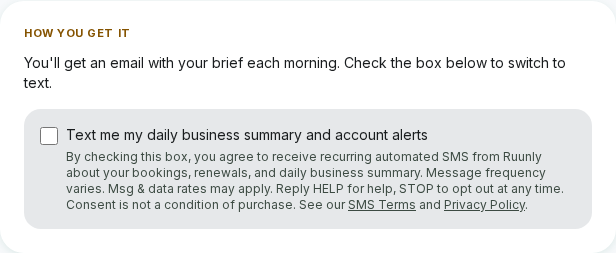
An account holder reaches this checkbox at Settings → Daily Office Brief. The box is unchecked by default and is never required to keep using Ruunly.
Where you opt in
- Account settings. Under Settings → Daily Office Brief, the delivery-channel card shows the SMS consent checkbox for account holders on a plan that includes text delivery.
- Any time. You can check or uncheck the box and save at any time; unchecking it switches your daily brief back to email immediately.
- Resuming after a STOP, if you previously opted in and later replied STOP, you can re-subscribe at any time by replying START.
What you'll receive
Booking alerts, renewal reminders, and your Daily Office Brief. A short morning summary of what’s on your plate (jobs, payments, anything needing attention). Message frequency varies with your account activity, up to roughly once per business day.
Opt out any time by replying STOP. Reply HELP for help. Msg & data rates may apply.
Sample messages
"Ruunly: Your daily brief. 2 jobs today, 1 overdue invoice ($150). Reply STOP to opt out."
"Ruunly: Your Pro subscription renews on Aug 1. Questions? Just reply. Reply STOP to opt out."
Full details: SMS Terms · Privacy Policy. No mobile information is shared with third parties or affiliates for marketing or promotional purposes.